Monday, October 31, 2011

Peopletools 8.52 client installation

Peopletools 8.52 is shipped with a client binaries installer. That’s new, but what is it exactly ? Well, it is the bare-minimum you need to work on a Peoplesoft database instance. That’s rather good if you have developers around, they probably do not need the entire installation on their own workstation. For those who know the Peoplesoft OVM template, there was something similar in the latest one with the zipfile toolsclient.zip, please see here.
It is a much lighter installer, about 500Mb, from http://edelivery.oracle.com, select product pack “PeopleSoft Enterprise”, choose a platform (it does not actually matter which one), and click on “PeopleSoft PeopleTools 8.52 Media Pack”. Download “PeopleSoft PeopleTools 8.52 Client Only”, part V27722-01.
Note that the client is only for Windows plateform.
After unzipping, let’s go for the client install (here below on Windows 2008) :
 PT85200wc_001 
PT85200wc_003
PT85200wc_004
The license code is the same for the “standard” Peopletools install :
PT85200wc_005
Usually, the Non-Unicode/Unicode type is for the data we are loading into the database, since it won’t install any of the loading scripts and data files, I’m wondering why the question is there and what it does exactly, but keep consistency with you whole environment:
 PT85200wc_006
Choose a directory to install into :
PT85200wc_007
PT85200wc_008
PT85200wc_009
Here also I’m not sure to understand why the PSEMHUB is there, it is used by the PSEMAgent, but you probably don’t want to manage remotely the client installation, but again, here we go :
PT85200wc_010
PT85200wc_011
PT85200wc_012
PT85200wc_013
In the process above, that’s interesting to note the installer never prompt for the Oracle binaries (%ORACLE_HOME%\bin) like it is for the server Peopletools installation on Windows.

The client can also be patch with the latest Peopletools patch, since the patch 8.52.02 is already available, let’s apply it on that client. So far, there’s no patch dedicated to the client only installation, so the patch is twice bigger than the client installer… :
PT85200wc_014
  PT85200wc_016
PT85200wc_017
PT85200wc_018
PT85200wc_019
PT85200wc_020
Here you decide what kind of installation you are doing. However, I’m not sure what will happen if you choose to patch a client and here below check “Full Install”. Is your client become a server ? It probably has to be tested. Let’s have a client only patch install :
PT85200wc_021
PT85200wc_022
PT85200wc_023
PT85200wc_024
PT85200wc_026

In the end of the process, here are the different folders present in the client home :
PT85200wc_025

It’s really a light install, no script, no data. Should you load a database, do not use that installation, go for a full (or server) installation instead.
But that’s still good to have for developers’ local workstation installation.
***
You may receive the following error when launching AppDesigner and DataMover (“the application has failed to start because its side-by-side configuration is incorrect”) :
PT85200wc_027
In that case, run from the client home, \setup\psvccrt\psvccrt_retail.msi, and follow the instruction :
PT85200wc_029
It should solve the problem, and you will be able to run AppDesigner and DataMover from now.

Last but not least, it is not certified on Windows XP, I tried it though. “Not certified” has never meant “not working”, so, whether the installer Disk1\setup.bat seems hanging forever, the exe file under “Disk1\InstData\setup.exe” run fine and Peopletools 8.52 is installing successfully on my Windows XP SP3 Pro workstation.

Nicolas.

Saturday, October 29, 2011

Peopletools patch 8.52.02 unzipping issue

Peoplesoft delivered the patch 02 of Peopletools 8.52. As usual, the patch is zipped and password protected. But that time, the password contains a “very” special character, I named exclamation mark (!).

Unzipping a file within a password on Unix/Linux is quite simple :
unzip –P password zipfile.zip

Now the given instruction is something like this :
unzip –P "pass!word" zipfile.zip
The double-quotes should make the command successful in most of the cases even with special characters.

But because of the exclamation mark, it won’t work. The following error is returned :
-bash: !word": event not found

I won’t give the password here (password is available on My Oracle Support only – paid support required), but just a workaround to get the patch unzipped. The instruction should be :
unzip -P "pass"'!'"word" zipfile.zip
Note the double-quote and simple-quote around the exclamation mark.

Probably that exception  has been forgotten by Oracle people when building the zip file or when writing the documentation shipped with the patch.

Hope that helps,

Nicolas.

Friday, October 28, 2011

Peopletools 8.52 is released !

Two weeks ago, I wrote a blog entry about Peopletools 8.52 to get the infrastructure ready. Now it is done, Peopletools 8.52 is here, it has been released !
Available on edelivery, it is 3 disks (rather funny the 3rd is only 18M).
As previously announced no more WebSphere and COBOL software shipped within the Peopletools bundle.
A good surprise, a Windows client dedicated installer (Windows Client only - 598M, could make life easier on workstation).
Unless it is still too early, I did not see the traditional first patch on ftp://ftp.peoplesoft.com/outgoing/ptools for the corresponding release (on My Oracle Support neither), to be tracked.
As far as I read the Installation Documentation (available on edelivery), the installation itself does not change that much, I'll write a blog entry as soon as I'll done with one install. However, there's a really big change with the PSADMIN menu, it is worth to try !

Last but not least, so far none of the applications have been recut yet with the new Peopletools version, so be careful and do not forget to manage a Peopletools upgrade of your newly application installation within that Peopletools 8.52.

To be continued with the install,

Nicolas.

NB (28/10/2011 18:44 CET) : I was probably far too optimistic on patch, the “first” patch is now available, but not as 8.52.01, rather odd, but that’s 8.52.02, see ftp://ftp.peoplesoft.com/outgoing/ptools/85202/
NB (29/10/2011) : and here the announcement http://blogs.oracle.com/peopletools/entry/peopletools_8_52_is_generally

Thursday, October 20, 2011

OEM 12c

A new version of Oracle Enterprise Manager has been released sometime ago, the 12c !
The first thing I can say is regarding the Installer, it now includes all the requisites (well, except database). Weblogic is installed at the same time, no need anymore to look for it, which version, which patch as it was on previous version 11gr1.
The installation can really take a while depending of the network, but in the end it’s really nice :
OEM12c_031
What a change compared to all the previous version ! And changes do not stop on the login page, it is rather disturbing to get all the new habits, but that’s just a matter of time…
Home page :
OEM12c_033 OEM12c_034
And here the databases list :
OEM12c_035
I don’t know yet how heavy it is in terms of resources on the server, but looks really nice.
Few things though :
1. no Peoplesoft plugin yet for that version
2. OEM12c Server Manager is only certified within Agent 12c… hopefully all your databases are running on OS which support it.
3. Surprising (for me), it is not yet certified on Linux 6.x

Enjoy it,

Nicolas.

Oracle 11.2.0.3 patchset

Sometime ago has been released the latest patchset, 11.2.0.3 (so far Linux only). Whether it is still not certified on Oracle Linux 6.x, it is working working fine.
Working in the same environment as I previously created here, Oracle Linux 6.0 and Oracle database 11.2.0.2, I’m doing an out-of-place upgrade.
The installer is complaining about missing RPMs…
Oracle11203_017 
Installing the corresponding RPMs (and remove pdksh if already installed, replaced by ksh) :

[root@orion4:/mnt]# mount /dev/cdrom /mnt/cdrom
mount: block device /dev/sr0 is write-protected, mounting read-only
[root@orion4:/mnt]# cd /mnt/cdrom/
[root@orion4:/mnt/cdrom]# cd Packages/
[root@orion4:/mnt/cdrom/Packages]# rpm -Uvh compat-libcap1-1.10-1.x86_64.rpm
warning: compat-libcap1-1.10-1.x86_64.rpm: Header V3 RSA/SHA256 Signature, key ID ec551f03: NOKEY
Preparing...                ########################################### [100%]
   1:compat-libcap1         ########################################### [100%]
[root@orion4:/mnt/cdrom/Packages]# rpm -Uvh ksh-20100621-2.el6.x86_64.rpm
warning: ksh-20100621-2.el6.x86_64.rpm: Header V3 RSA/SHA256 Signature, key ID ec551f03: NOKEY
error: Failed dependencies:
        pdksh conflicts with ksh-20100621-2.el6.x86_64
[root@orion4:/mnt/cdrom/Packages]# rpm -e pdksh
[root@orion4:/mnt/cdrom/Packages]# rpm -Uvh ksh-20100621-2.el6.x86_64.rpm
warning: ksh-20100621-2.el6.x86_64.rpm: Header V3 RSA/SHA256 Signature, key ID ec551f03: NOKEY
Preparing...                ########################################### [100%]
   1:ksh                    ########################################### [100%]
[root@orion4:/mnt/cdrom/Packages]#
[root@orion4:/mnt/cdrom/Packages]# cd /
[root@orion4:/]# umount /dev/cdrom
[root@orion4:/]#
Then check again and it’s going smoothly :
Oracle11203_018

Oracle11203_021
After changing the ORACLE_HOME setting of oracle user (OS user), upgrading the database successfully as well :
Oracle11203_022
Oracle11203_023
Oracle11203_024 
Oracle11203_025 Oracle11203_026 Oracle11203_027 Oracle11203_028 Oracle11203_029

You can see the new features coming within this patchset in the on-line documentation.

Enjoy,

Nicolas.

Thursday, October 13, 2011

Peopletools 8.52 : get your infrastructure ready

It has been discussed several times during the last Oracle Open World 2-6 oct. 2011, Peopletools 8.52 is just next to the door. It seems this version will change a lot of things, see the pre-release notes #1335812.1 and the value proposition #1327656.1.
But in order to be able to run this Peopletools 8.52 version, the infrastructure needs to be up to dated. There’re indeed a couples of changes and decommissioned platforms on server as well as client side which may imply some work in front.
Starting  by the client :
Up to Peopletools 8.51, Windows XP Pro (32bit) was certified and worked fine as a client for AppDesigner for developers. It is now ended. Not sure if it will work, but it is not planned to be certified. I know, Windows XP is quite an old OS, but still widely used. Client must be now on Windows 7, Vista (who really wants it by now ?), or Windows 2008 (honestly, I don’t know many workstation on that version). Keep in mind to verify the edition.
Speaking on client side, browsing is also changing a lot, a very new nice one, Apple iPad (browser Safari) will be certified ! And finally, Peoplesoft is introducing certification of Google Chrome.
On server side :
OS:
HP-UX PA-RISC certification is now definitely ended, AIX 5.3 is also ended (7.1 added).
Surprisingly, Oracle Linux 6.x is not planned to be certified (right, Oracle database is not certified yet on this Linux version), but I tend to think it will be certified soon too.
Database : Oracle 11.2.0.2, 11.1.0.7 and 10.2.0.5 (10.2.0.4 and earlier is ended), probably the newly released 11.2.0.3 patchset will also be certified soon (not planned yet).
Applications : they must be 8.9 or above, whereas Peopletools 8.51 was certified from within applications 8.8.
WebSphere : keep in mind, that within Peopletools 8.52, WebSphere won’t be provide anymore, support must be obtained from IBM to get the software.
COBOL compiler : similarly to the above, Peopletools 8.52 won’t come anymore with a compiler, support must be obtained from the vendor (not only Microfocus, but also IBM).
Regarding these last two points, please read this roadmap.

Except that Peopletools 8.50 was certified on x64 architecture only, I don’t think there were so many changes on the previous 8.5x versions.
So, if you want the coming soon Peopletools 8.52 and are in one of the ended certifications as describe above, prepare your infrastructure for a change. Or if that’s for demo, proof of concept and/or training purpose, you can always wait for the associated Oracle VM Peoplesoft templates (well, that supposes you have a spare server in a corner for hosting Oracle VM… that’s an other story), but not sure how long it will take to be available.
All these changes could be quite problematic if you have to deal with much older Peopletools release and Application version… which require different OS on server but also on client side (Peopletools 8.48 and earlier are not certified on Windows 7).

Administration tasks :
Few administration tasks may also change.
New variable : this could have an impact on your architecture as well, in Peopletools 8.50 has been introduced a new environment variable, PS_CFG_HOME to decouple the application/batch domain from the PS_HOME. A new one is coming within Peopletools 8.52 to separate the application installation home from the Peopletools installation home, PS_APP_HOME. It often confused new-comers in Peoplesoft world, why the application must be installed in the same folder as the Peopletools, now it is finished, we could install application where ever we want using that variable, and have multiple applications pointing to a unique Peopletools home directory.
PSADMIN menu : new options to manage the PIA such as create, clone, delete, check status…
Active DataGuard : I hope also Peoplesoft be more integrated within Active Data Guard, as I showed in an earlier blog entry there’s no Crystal, COBOL and SQR on a standby database supported. But I’m quite disappointed, it does not appear to be in the pre-release notes linked above.

This Peopletools 8.52 will change a lot of things, here was a non-exhaustive list on admin side, but there’s much more.
I’m really looking forward that new version.

Enjoy,

Nicolas.

PS: please note that this blog entry is based on “pre-release” notes and current certification matrix as of today – 13-OCT-2011, so it may change…

Friday, September 30, 2011

Application server load balancing and failover

In a previous blog’s entry, I explained about Multiple application messaging servers on Peopletools 8.51 and facilities for load balance and failover on messaging domain server.
In a very similar way, the application server can also be used in load balance and failover configuration.
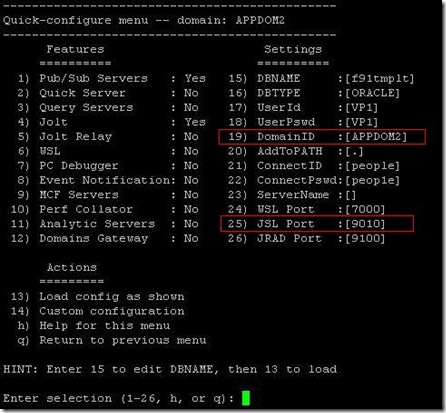
First of all, you need at least two applications servers, please note that if you are on the same server, then domain name and JSL (jolt) port should be different from each other. Of course, there are not many advantages to have this configuration if working on one and only one server, but rather good to have different server, if one crash, the other one takes place.
Here we go.
First application server :
Apps_LoadB_001 
And the second one :
Apps_LoadB_002
Please, note that whether I name one “first” and the other one “second”, there is no precedence of one compared to the other by default (except if you define a weight in configuration.properties, but let’s leave it for later explanation).
Then starting each application server
Apps_LoadB_003 
Note that the number of listened ports regarding Jolt is defined is the psappsrv.cfg of the domain as following :
[JOLT Listener]
;=========================================================================
; Settings for JOLT Listener
;=========================================================================
Address=%PS_MACH%
Port=9000
Encryption=0
Min Handlers=5
Max Handlers=7
In the current case, the ports between 9000 and 9005 will be immediately in use after started :
[psadm2@psovmfscmfp1 APPDOM]$ netstat -an|grep 900
tcp        0      0 192.168.1.150:9000          0.0.0.0:*                   LISTEN
tcp        0      0 192.168.1.150:9001          0.0.0.0:*                   LISTEN
tcp        0      0 192.168.1.150:9002          0.0.0.0:*                   LISTEN
tcp        0      0 192.168.1.150:9003          0.0.0.0:*                   LISTEN
tcp        0      0 192.168.1.150:9004          0.0.0.0:*                   LISTEN
tcp        0      0 192.168.1.150:9005          0.0.0.0:*                   LISTEN
[psadm2@psovmfscmfp1 APPDOM]$
It means the second domain needs to be configured with a port above 9005.
Apps_LoadB_004 

Here’s the output from the database side, since my two apps are on the same machine, there’s nothing really useful so far, cannot distinguished which domain a database session is coming from :
SQL> select username,program, client_info from v$session where username = 'SYSADM'
SQL> /

USERNAME                       PROGRAM                                          CLIENT_INFO
------------------------------ ------------------------------------------------ ----------------------------------------------------------------
SYSADM                         PSSUBDSP@psovmfscmfp1.phoenix.nga (TNS V1-V3)    VP1,psadm2,psovmfscmfp1.phoenix.nga,,PSSUBDSP,
SYSADM                         PSSUBHND@psovmfscmfp1.phoenix.nga (TNS V1-V3)    VP1,psadm2,psovmfscmfp1.phoenix.nga,,PSSUBHND,
SYSADM                         PSPUBDSP@psovmfscmfp1.phoenix.nga (TNS V1-V3)    VP1,psadm2,psovmfscmfp1.phoenix.nga,,PSPUBDSP,
SYSADM                         PSBRKDSP@psovmfscmfp1.phoenix.nga (TNS V1-V3)    VP1,psadm2,psovmfscmfp1.phoenix.nga,,PSBRKDSP,
SYSADM                         PSPUBHND@psovmfscmfp1.phoenix.nga (TNS V1-V3)    VP1,psadm2,psovmfscmfp1.phoenix.nga,,PSPUBHND,
SYSADM                         PSBRKHND@psovmfscmfp1.phoenix.nga (TNS V1-V3)    VP1,psadm2,psovmfscmfp1.phoenix.nga,,PSBRKHND,
SYSADM                         PSSAMSRV@psovmfscmfp1.phoenix.nga (TNS V1-V3)    VP1,psadm2,psovmfscmfp1.phoenix.nga,,PSSAMSRV,
SYSADM                         PSQRYSRV@psovmfscmfp1.phoenix.nga (TNS V1-V3)    VP1,psadm2,psovmfscmfp1.phoenix.nga,,PSQRYSRV,
SYSADM                         PSAPPSRV@psovmfscmfp1.phoenix.nga (TNS V1-V3)    VP1,psadm2,psovmfscmfp1.phoenix.nga,,PSAPPSRV,
SYSADM                         PSMONITORSRV@psovmfscmfp1.phoenix.nga (TNS V1-V3 VP1,psadm2,psovmfscmfp1.phoenix.nga,,PSMONITORSRV,
SYSADM                         PSSUBDSP@psovmfscmfp1.phoenix.nga (TNS V1-V3)    VP1,psadm2,psovmfscmfp1.phoenix.nga,,PSSUBDSP,
SYSADM                         PSSUBHND@psovmfscmfp1.phoenix.nga (TNS V1-V3)    VP1,psadm2,psovmfscmfp1.phoenix.nga,,PSSUBHND,
SYSADM                         PSPUBDSP@psovmfscmfp1.phoenix.nga (TNS V1-V3)    VP1,psadm2,psovmfscmfp1.phoenix.nga,,PSPUBDSP,
SYSADM                         PSPUBHND@psovmfscmfp1.phoenix.nga (TNS V1-V3)    VP1,psadm2,psovmfscmfp1.phoenix.nga,,PSPUBHND,
SYSADM                         PSBRKDSP@psovmfscmfp1.phoenix.nga (TNS V1-V3)    VP1,psadm2,psovmfscmfp1.phoenix.nga,,PSBRKDSP,
SYSADM                         PSMONITORSRV@psovmfscmfp1.phoenix.nga (TNS V1-V3 VP1,psadm2,psovmfscmfp1.phoenix.nga,,PSMONITORSRV,
SYSADM                         PSBRKHND@psovmfscmfp1.phoenix.nga (TNS V1-V3)    VP1,psadm2,psovmfscmfp1.phoenix.nga,,PSBRKHND,
SYSADM                         PSAPPSRV@psovmfscmfp1.phoenix.nga (TNS V1-V3)    VP1,psadm2,psovmfscmfp1.phoenix.nga,,PSAPPSRV,
SYSADM                         PSSAMSRV@psovmfscmfp1.phoenix.nga (TNS V1-V3)    VP1,psadm2,psovmfscmfp1.phoenix.nga,,PSSAMSRV,
SYSADM                         PSAPPSRV@psovmfscmfp1.phoenix.nga (TNS V1-V3)    VP1,psadm2,psovmfscmfp1.phoenix.nga,,PSAPPSRV,

21 rows selected.

Now, webserver configuration to be done in configuration.properties file ($PS_HOME/webserv/peoplesoft//applications/peoplesoft/PORTAL.war/WEB-INF/psftdocs/ps).
This is a easy configuration, put the application servers separated by simple comma as following :
[psadm2@psovmfscmfp1 peoplesoft]$ more ./applications/peoplesoft/PORTAL.war/WEB-INF/psftdocs/ps/configuration.properties
<<...snipped...>>
# psserver must point to your application server machine name (recommended) or IP address
# and JOLT port.  The PeopleTools release of the application server must match the PeopleTools
# release of the PeopleSoft files on the web server.
#
# To enable jolt failover and load balancing, provide a list of application server
# domains in the format of;  psserver=AppSrvr:JSLport,...
# For example:  psserver=SERVER1:9000,SERVER2:9010,SERVER3:9020
## sd="Application Server Connect String", ld="This string embodies the failover and load balancing string for PIA to connect to Application Server domains.  Consult the PeopleB
ooks recommendations on load balancing and failover for more information.  The format is psserver=AppSrvr:JSLport where AppSrvr is your fully qualified domain name.   Multiple d
omains should be comma separated", tip="Format: psserver=AppSrvr:JSLport where AppSrvr is your fully qualified domain name, e.g  psserver=SERVER1.oracle.com:9000,SERVER2.oracle.
com:9010"
psserver=psovmfscmfp1:9000,psovmfscmfp1:9010
## sd="Jolt Pooling", dt="c", ld="Enable Jolt Pooling"
joltPooling=true
<<...snipped...>>
Configured as above, all the application servers have the same weight (the same priority) in the round-robin algorithm. This algorithm affect ingoing transaction randomly to one or the other configured application server, there’s no priority, no load checkup, no network checkup, it’s just random (find out more in the My Oracle Support note E-WS: Load Balancing Options for Web Server and Application Server [ID 618367.1]).
But we could also introduced weight (from 1 to 10) on application server to make one precedence on the other as following :
psserver=psovmfscmfp1:9000#10,psovmfscmfp1:9010#1
In that case, the first server can takes extra work for an heavy load compared to the second one. 

Not only the load balance will be set, but the failover as well.

After the first connection to the front end application, we can check the client status of both application servers :
Apps_LoadB_007 
We can see a first pool as been instantiated.
Since round-robin algorithm is randomly given connection to the application server, it’s not always easy to show when alone, furthermore, the pool connection are making it even less simple.
But you probably can check it from the back end :
SQL> select username,program, client_info from v$session where username = 'SYSADM'
  2* order by 2
SQL> /

USERNAME                       PROGRAM                                          CLIENT_INFO
------------------------------ ------------------------------------------------ ----------------------------------------------------------------
SYSADM                         PSAPPSRV@psovmfscmfp1.phoenix.nga (TNS V1-V3)    NGA,,192.168.1.202,APPDOM,PSAPPSRV,
SYSADM                         PSAPPSRV@psovmfscmfp1.phoenix.nga (TNS V1-V3)    VP1,,192.168.1.202,APPDOM2,PSAPPSRV,
SYSADM                         PSAPPSRV@psovmfscmfp1.phoenix.nga (TNS V1-V3)    NGA,,192.168.1.202,APPDOM,PSAPPSRV,
SYSADM                         PSAPPSRV@psovmfscmfp1.phoenix.nga (TNS V1-V3)    VP1,,192.168.1.202,APPDOM2,PSAPPSRV,

Here, from the same client machine, different users are in connected through the 2 applications servers (APPDOM and APPDOM2).

Now, let’s simulate a application server crash :
Apps_LoadB_010
The online users won’t be disconnected, and the opened connections are automatically redirected to the second application server (failover) :
Apps_LoadB_011
A second pool is now created, but that one on APPDOM2. Everything will be transparent to the front end users.

Find out more in the OTN hosted Peoplebooks : Working with Jolt Configuration Options

Nicolas.

PS: whilst I was writing this blog entry, I was reading an interesting note as well recommending the use of IP address instead of the server name for security reason in the configuration.properties (worth reading it Health Check Alert: Consider setting PSSERVER for web server JOLT connections to refer to an IP-address:port combination [ID 957484.1]).

Monday, September 19, 2011

3 months update later, finally

I did not maintained this blog for quite a while during this last quarter, I should apology to the readers.
What happened during that time ? “Finally” is probably the word to keep in mind for that period.

CentOS 6.0
In July, CentOS finally released the version 6.0. It has been a very long waiting and many people moved away for an other (equivalent) distribution, I named Scientific Linux (see below). I do not know if the CentOS dev. team made the rights choice to go for the version 6.0 before the update 5.7, but truly enough, no update at all for several months is quite unusual and rather disappointed even though that’s a free distribution.
I did not tested this version yet, but according to my reading across a couple of article on Internet, it could have been done much better especially after that long (long) waiting.
Now, we may have to wait for the update 6.1 which has been promised very soon, still have to define “soon”.

CentOS 5.7
Few days ago, earlier in Sept., we also get that update I was looking for several months too. Much appreciated, the upgrade from 5.6 went smoothly, as usual. The only thing for that one was the delay since the RHEL 5.7 date release. Again, a lot of debates on that…

Oracle Linux 6.1
Of course, this is also free (the use, not the support), but developed by a company, a big company, so the time to get the new version is quite different compared to CentOS.
Oracle Linux is available since the 1st of June, 5.7 since August.

Scientific Linux 6.1 and 5.7
An other free distribution of a RHEL recut, Scientific Linux interest has considerably grown since CentOS took too much time for the newest release delivery.
Whether the update 5.7 has just been released, their update 6.1 is already out for a month. Some can argue the developers behind are also paid… still, this distribution has a good chance to see new customers.

Oracle VM 3.0 (August, the 23rd)
After several years of promises, Oracle has finally released a new version of their virtualization software, Oracle VM 3.0. A lot of new things has to be discovered, according to Oracle, it is much better than ever. But have they not too late compared the the concurrent like VMWare vSphere Hypervisor ?

Open World
On Oracle database and Peoplesoft sides, no major thingy, nothing unusual or non expected, the summer was rather quiet. So, no worries.
But the Oracle Open World is just in the corner by now. Probably we have to count on new Peopletools version 8.52 around that event, maybe new Peoplesoft OVM templates as well (?). Saying about Oracle Open World, this year I won’t attend. I hope attendees will report back on their blog about the exciting sessions.

Other
Above all, and most importantly my son is born also the 23rd of August, which explain the delay and absence of blog update a bit before and since then… but I’ll be back.
The only “problem” I have now, the room which was used to be my server room is occupied. I have to find new space for my noisy server and NAS. But that’s the part of the fun to have children !

Nicolas.

Multiple application messaging servers

In a standard mode, when dealing within messaging, one domain is configured as followed, and most of the time it is enough :
MultipleDomains_001
However, if you have to deal with a high number of messages, to process a maximum number of messages, you may want to create multiple domains to handle those messages.
Let’s create a new one as below : 
MultipleDomains_003 MultipleDomains_004
Then, coming back on the domain status’ page, we see that new domain :
MultipleDomains_005
We have to activate it to make this new domain processing messages. Change the status, and click “update” button : 
MultipleDomains_006
MultipleDomains_007
Here we go. An error is raised, we cannot have more than one master domain. And being master is set by default for a given domain.
MultipleDomains_008
What is that ?
A master domain can be used to balance ingoing/outgoing messages between master and slave(s) domains. Particularly useful when dealing a very high number of messages in a short time.

We can handle it in two ways.

1. Static slave
In the configuration file appsrv.cfg, we can change a parameter value – Domain Slave Mode – from 0 to 1 to make the domain a slave domain.
Change from default value
MultipleDomains_009
To 
MultipleDomains_010
Reload the application server domain, and coming back to the domain status’ page to make it active :
MultipleDomains_011
MultipleDomains_012 
After updating the status, we can see the domain APPDOM2 activated and also that’s a slave domain. It is fixed, there’s no way to change but modify the configuration file manually and reload again the domain.
Without any failover set, it is probably the easiest way to achieve the goal : handle a high number of messages, you could make multiple slaves domains all managed by one and only master domain.
Using multiple slaves domains can also be useful, you could set a load balance in between all of them (click on “Master/Slave LoadBalance”) to configure all the priorities, such as following :
MultipleDomains_013

2. Dynamic slave
An other way for handling a high number of messages and multiple domains would be to make slave domain dynamic. It is maybe a little bit more tricky, but also probably more reliable and scalable.
A dynamic slave domain can become a master domain in case of failure of the current master domain. Really nice features if the messages have to be processed asap or with a minimum of down-time.
So, we return back to the original domain status’ page, the second domain APPDOM2 is inactive (it is not set as static slave in the configuration file):
MultipleDomains_023
Click on “SetUp Failover”, then check “enable Failover”, define a failover time (when the slave domain has to become master after original master failure, here 5 minutes) and most importantly check “Dynamic Slave Option”. Finally set a failover priority (1, 2, 3…) and save :
MultipleDomains_024
It makes that second domain defined as dynamic slave as shown above in the failover setting as well as below in the domain status page :
MultipleDomains_025
From now, we have two domains which proceed with the messages, given the fact that if the first one fails, the second will become the master.
Just to show it, here I stopped the first domain APPDOM, once the failover time is off (as shown earlier, 5 minutes), we can see the second domain APPDOM2 becoming master (it is not “dynamic slave” anymore), and the first obviously becoming inactive :
MultipleDomains_028MultipleDomains_029 
When the first domain APPDOM is restarted, it becomes the slave domain whereas the second domain APPDOM2 remains the master.
MultipleDomains_030


Making choice between static and dynamic slave domain may not be an easy task, it depends of your all architecture and requirements you have in messages processing. The first might be useful on not so big environment whereas the second is more than recommended on big environments (you don’t want to make dynamic domain on non-messages dedicated domain).

Enjoy,

Nicolas.

Find out more on OTN hosted Peoplebooks : http://download.oracle.com/docs/cd/E24150_01/pt851h2/eng/psbooks/tiba/book.htm?File=tiba/htm/tiba13.htm