You had change the amount of memory of the guest OS, or added some more RAM, the swap swap space should be updated.
I followed the below procedure.
Check the current swap space and mount points :
[root@orion:/root] ()$ swapon -s
Filename Type Size Used Priority
/dev/mapper/VolGroup00-LogVol01 partition 2031608 0 -1
[root@orion:/root] ()$ df -h
Filesystem Size Used Avail Use% Mounted on
/dev/mapper/VolGroup00-LogVol00
141G 8.4G 126G 7% /
/dev/sda1 99M 13M 82M 14% /boot
none 1.3G 0 1.3G 0% /dev/shm
192.168.1.11:/nfs/peoplesoftcd
97G 60G 37G 62% /nfs/software/peoplesoft
192.168.1.11:/nfs/oraclecd
97G 60G 37G 62% /nfs/software/oracle
Create a new file to receive extra swap space (1Gb more) :
[root@orion:/root] ()$ dd if=/dev/zero of=/extraswap bs=1M count=1024
1024+0 records in
1024+0 records out
Make the file as swap :
[root@orion:/root] ()$ mkswap /extraswap
Setting up swapspace version 1, size = 1073737 kB
Turn on the file as swap :
[root@orion:/root] ()$ swapon /extraswap
Check the new swap space and mount points (new file has been added) :
[root@orion:/root] ()$ swapon -s
Filename Type Size Used Priority
/dev/mapper/VolGroup00-LogVol01 partition 2031608 0 -1
/extraswap file 1048568 0 -2
[root@orion:/root] ()$
To take in account the change on the next reboot, add the line /extraswap...
[root@orion:/root] ()$ more /etc/fstab
# This file is edited by fstab-sync - see 'man fstab-sync' for details
/dev/VolGroup00/LogVol00 / ext3 defaults 1 1
LABEL=/boot /boot ext3 defaults 1 2
none /dev/pts devpts gid=5,mode=620 0 0
none /dev/shm tmpfs defaults 0 0
none /proc proc defaults 0 0
none /sys sysfs defaults 0 0
/dev/VolGroup00/LogVol01 swap swap defaults 0 0
/extraswap none swap sw 0 0
# Beginning of the block added by the VMware software
.host:/ /mnt/hgfs vmhgfs defaults,ttl=5 0 0
# End of the block added by the VMware software
192.168.1.11:/nfs/peoplesoftcd /nfs/software/peoplesoft nfs rw,vers=2 0 0
192.168.1.11:/nfs/oraclecd /nfs/software/oracle nfs rw,vers=2 0 0
/dev/hdc /media/cdrom auto pamconsole,fscontext=system_u:object_r:removable_t,exec,noauto,managed 0 0
/dev/fd0 /media/floppy auto pamconsole,fscontext=system_u:object_r:removable_t,exec,noauto,managed 0 0
[root@orion:/root] ()$
Enjoy,
Sunday, December 30, 2007


On The Peoplesoft Road : Cygwin (XClient and NFS)
After installing VMWare, which allowed to build an other OS on-line, after installing OEL4.6, it's almost time to start the Oracle database installation.
Before to go in that direction, and since I've already downloaded all the required software on my Windows host OS, I need to share some folders with my new OS to avoid FTP transfer or other weird thing.
So, I would like my Windows host like a NFS server. And I would like a XWindow client for interactive installation of Oracle.
Cygwin is one of the solution, there are other, at least for XWndow client, as it explained very well by Ivan Kartik on his blog few days ago : Choosing X client for graphical installation
Cygwin offer the possibilities of the two (three) requirements : first a XClient, second a NFS server (and it's free).
Let's start.
Open your favorite browser, and enter the following url to run the installation : http://cygwin.com/setup.exe
Choose the installation from internet, you have to choose a server, take care, all the server are not up and running. The following link worked fine for me : http://cygwin.cybermirror.org
You'll see a list of package, expand the list to check some of them.
For XClient usage, you'll have to check the followings ones :
xorg-x11-base (2 KiB; required, automatically selects a base set of packages for the typical installation)
xorg-x11-bin (1.2 MiB; optional, executables for xterm, twm, etc.)
xorg-x11-bin-dlls (2 MiB; optional, libraries (DLLs) for executables.)
xorg-x11-bin-lndir (5 KiB; optional, lndir program, useful for developing)
xorg-x11-devel (964 KiB; optional, additional files needed to compile programs for Cygwin/X)
xorg-x11-etc (335 KiB; required, configuration files for the X Server and programs in xorg-x11-bin)
xorg-x11-f100 (12 MiB; optional, 100 dpi fonts (75 dpi fonts are used by default))
xorg-x11-fcyr (368 KiB; optional, Cyrillic fonts)
xorg-x11-fenc (489 KiB; required, font encodings)
xorg-x11-fnts (16.4 MiB; required, 75 dpi fonts)
xorg-x11-fscl (2.2 MiB; optional, Speedo and Type1 scalable fonts)
xorg-x11-fsrv (201 KiB; optional, X Font Server)
xorg-x11-libs-data (154 KiB; required, X11R6/lib/ files)
xorg-x11-man-pages (551 KiB; optional, man pages)
xorg-x11-man-pages-html (596 KiB; optional, man pages in html format)
xorg-x11-nest (1.1 MiB; optional, Xnest nested X Server)
X-start-menu-icons (4 KiB; optional, adds icons for X Clients to the Start menu)
X-startup-scripts (22 KiB; required, example X Server and client startup scripts)
xorg-x11-vfb (1.2 MiB; optional, X Virtual Frame Buffer (Xvfb) server)
xorg-x11-xwin (1.3 MiB; required, the Cygwin/X X Server)
xorg-x11-xwin-gl (761 KiB; optional, the Cygwin/X X Server with ***EXPERIMENTAL*** GLX acceleration)
For NFS usage, add check the following ones : vim, nfs-server, sunrpc, cygrunsrv
You may also want to ensure that the inetutils and openssh packages are selected if you wish to use telnet and ssh to connect to remote machines.
Continue the installation until the end, "click next"...
A new icon has been added on your desktop, open it.
For a XClient, run the command in the new opened DOS window :
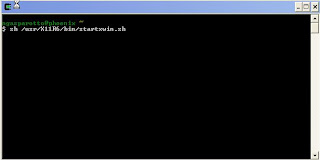
A new terminal window is opened, you can connect to your server by the command :
ssh -Y ServerIPAddress
Then you can test by XClock command :
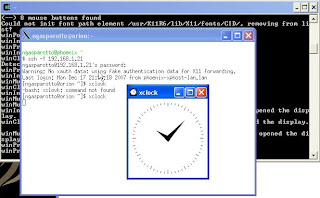
You can connect now as the expected user for your software installation.
For NFS server, there are additional steps.
1. On your host OS (my Windows XP OS) :
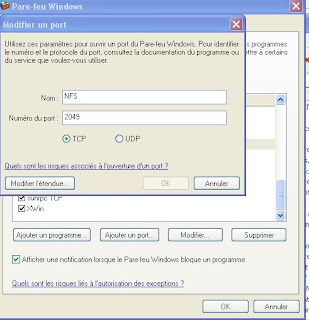
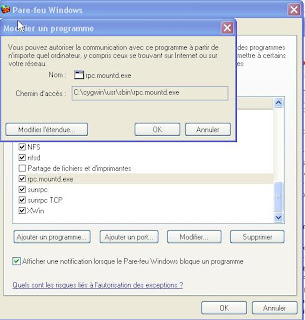
1a. Enable the ports and services on the firewall
NFS/2049/TCP
nfsd/2049/UDP
sunrpc/111/UDP
sunrpc TCP/111/TCP
C:\cygwin\usr\sbin\rpc.mountd.exe
Examples (well, the screenshots are in French, but I don't think it's a problem here) :
1b. Run the Cu\ygwin program, it open a DOS window command prompt, run the NFS installation :
/usr/bin/nfs-server-config
Default answer should be ok in most of cases.
Allowed the remote server to access on your NFS server by inserting (use vi editor) a line in /etc/hosts.allow file :
nfsd: 192.168.1.21
The /etc/hosts.deny file can be empty.
1c. I want to share two directories F:\PeopleSoftCD and F:\OracleCD, then run the following commands (always in the Cygwin DOS window) :
mkdir -p /nfs/peoplesoftcd
mount F:/PeopleSoftCD /nfs/peoplesoftcd
mkdir -p /nfs/oraclecd
mount F:/OracleCD /nfs/oraclecd
1d. Insert the two new mount points in the /etc/exports file (NB : IP address of your remote server, rw for read/write access, no_root_squash to allowed the root connection) :
/nfs/peoplesoftcd 192.168.1.21(rw, no_root_squash)
/nfs/oraclecd 192.168.1.21(rw, no_root_squash)
1e. Lastly, on the Windows host, there are three services associated with NFS, you have to start and stop them to take in account all the previous modifications :
Cygwin mountd
Cygwin nfsd
Cygwin portmap
2. On your remote server, currently my OEL4.6 OS server,
2a. By a telnet/ssh connection (the IP address the one from the host Windows which share the directories) :
mkdir -p /nfs/software/peoplesoft
mount -t nfs 192.168.1.11:/nfs/peoplesoftcd /nfs/software/peoplesoft
mkdir -p /nfs/software/oracle
mount -t nfs 192.168.1.11:/nfs/oraclecd /nfs/software/oracle
Now it should work.
2b. To make the NFS mount points as permanent, even after a server reboot, you have to update the /etc/fstab file, by adding the two following lines :
192.168.1.11:/nfs/peoplesoftcd /nfs/software/peoplesoft nfs rw,vers=2 0 0
192.168.1.11:/nfs/oraclecd /nfs/software/oracle nfs rw,vers=2 0 0
Now, I'm happy, from my guest/remote OS, I'm able to read my host/local directories' software installation.
Enjoy,
Before to go in that direction, and since I've already downloaded all the required software on my Windows host OS, I need to share some folders with my new OS to avoid FTP transfer or other weird thing.
So, I would like my Windows host like a NFS server. And I would like a XWindow client for interactive installation of Oracle.
Cygwin is one of the solution, there are other, at least for XWndow client, as it explained very well by Ivan Kartik on his blog few days ago : Choosing X client for graphical installation
Cygwin offer the possibilities of the two (three) requirements : first a XClient, second a NFS server (and it's free).
Let's start.
Open your favorite browser, and enter the following url to run the installation : http://cygwin.com/setup.exe
Choose the installation from internet, you have to choose a server, take care, all the server are not up and running. The following link worked fine for me : http://cygwin.cybermirror.org
You'll see a list of package, expand the list to check some of them.
For XClient usage, you'll have to check the followings ones :
xorg-x11-base (2 KiB; required, automatically selects a base set of packages for the typical installation)
xorg-x11-bin (1.2 MiB; optional, executables for xterm, twm, etc.)
xorg-x11-bin-dlls (2 MiB; optional, libraries (DLLs) for executables.)
xorg-x11-bin-lndir (5 KiB; optional, lndir program, useful for developing)
xorg-x11-devel (964 KiB; optional, additional files needed to compile programs for Cygwin/X)
xorg-x11-etc (335 KiB; required, configuration files for the X Server and programs in xorg-x11-bin)
xorg-x11-f100 (12 MiB; optional, 100 dpi fonts (75 dpi fonts are used by default))
xorg-x11-fcyr (368 KiB; optional, Cyrillic fonts)
xorg-x11-fenc (489 KiB; required, font encodings)
xorg-x11-fnts (16.4 MiB; required, 75 dpi fonts)
xorg-x11-fscl (2.2 MiB; optional, Speedo and Type1 scalable fonts)
xorg-x11-fsrv (201 KiB; optional, X Font Server)
xorg-x11-libs-data (154 KiB; required, X11R6/lib/ files)
xorg-x11-man-pages (551 KiB; optional, man pages)
xorg-x11-man-pages-html (596 KiB; optional, man pages in html format)
xorg-x11-nest (1.1 MiB; optional, Xnest nested X Server)
X-start-menu-icons (4 KiB; optional, adds icons for X Clients to the Start menu)
X-startup-scripts (22 KiB; required, example X Server and client startup scripts)
xorg-x11-vfb (1.2 MiB; optional, X Virtual Frame Buffer (Xvfb) server)
xorg-x11-xwin (1.3 MiB; required, the Cygwin/X X Server)
xorg-x11-xwin-gl (761 KiB; optional, the Cygwin/X X Server with ***EXPERIMENTAL*** GLX acceleration)
For NFS usage, add check the following ones : vim, nfs-server, sunrpc, cygrunsrv
You may also want to ensure that the inetutils and openssh packages are selected if you wish to use telnet and ssh to connect to remote machines.
Continue the installation until the end, "click next"...
A new icon has been added on your desktop, open it.
For a XClient, run the command in the new opened DOS window :

A new terminal window is opened, you can connect to your server by the command :
ssh -Y ServerIPAddress
Then you can test by XClock command :

You can connect now as the expected user for your software installation.
For NFS server, there are additional steps.
1. On your host OS (my Windows XP OS) :
1a. Enable the ports and services on the firewall
NFS/2049/TCP
nfsd/2049/UDP
sunrpc/111/UDP
sunrpc TCP/111/TCP
C:\cygwin\usr\sbin\rpc.mountd.exe
Examples (well, the screenshots are in French, but I don't think it's a problem here) :


1b. Run the Cu\ygwin program, it open a DOS window command prompt, run the NFS installation :
/usr/bin/nfs-server-config
Default answer should be ok in most of cases.
Allowed the remote server to access on your NFS server by inserting (use vi editor) a line in /etc/hosts.allow file :
nfsd: 192.168.1.21
The /etc/hosts.deny file can be empty.
1c. I want to share two directories F:\PeopleSoftCD and F:\OracleCD, then run the following commands (always in the Cygwin DOS window) :
mkdir -p /nfs/peoplesoftcd
mount F:/PeopleSoftCD /nfs/peoplesoftcd
mkdir -p /nfs/oraclecd
mount F:/OracleCD /nfs/oraclecd
1d. Insert the two new mount points in the /etc/exports file (NB : IP address of your remote server, rw for read/write access, no_root_squash to allowed the root connection) :
/nfs/peoplesoftcd 192.168.1.21(rw, no_root_squash)
/nfs/oraclecd 192.168.1.21(rw, no_root_squash)
1e. Lastly, on the Windows host, there are three services associated with NFS, you have to start and stop them to take in account all the previous modifications :
Cygwin mountd
Cygwin nfsd
Cygwin portmap
2. On your remote server, currently my OEL4.6 OS server,
2a. By a telnet/ssh connection (the IP address the one from the host Windows which share the directories) :
mkdir -p /nfs/software/peoplesoft
mount -t nfs 192.168.1.11:/nfs/peoplesoftcd /nfs/software/peoplesoft
mkdir -p /nfs/software/oracle
mount -t nfs 192.168.1.11:/nfs/oraclecd /nfs/software/oracle
Now it should work.
2b. To make the NFS mount points as permanent, even after a server reboot, you have to update the /etc/fstab file, by adding the two following lines :
192.168.1.11:/nfs/peoplesoftcd /nfs/software/peoplesoft nfs rw,vers=2 0 0
192.168.1.11:/nfs/oraclecd /nfs/software/oracle nfs rw,vers=2 0 0
Now, I'm happy, from my guest/remote OS, I'm able to read my host/local directories' software installation.
Enjoy,
Friday, December 28, 2007
On The Peoplesoft Road : OEL 4.6
To be able to install Peoplesoft, I need an OS certified for Peoplesoft. OEL 5 is not yet certified, so I'll try OEL4.6.
After installing previously VMWare, created a Guest virtual machine, now it's the moment for OS.
OEL 4 update 6 has been downloaded the four CD from http://edelivery.oracle.com
Extract each doanloaded file, then burn them as ISO image on CD.
On the VMWare server, choose the virtual machine which will receive the new OS installation. Insert the first CD and start the virtual machine.
 Then, go onto the Console tab :
 Nice one, now, follow the instruction as well :


For the network configuration, take care, better to use fixed IP address (click on Edit button) :

 You can already allowed the SSH connection :


Choose your root password (at least 6 characters)
To be able to install the VMWare tools easily, you have to add some additional packages :

Add editors if you want : Add Administration Tools and System Tools :


 Insert the following CD when it ask you.
Lastly,


 The definition screen, important step regarding the VMWare, because I don't need the FullScreen mode, I choose the one which allow me to see all the screen inside the VMWare window.
 You have to choose the "default" user and password, the you have the login screen and the OEL desk :

 On the VMWare window corresponding to the current virtual machine, then Add VMWare tool. A virtual CD is added on the OEL desk, open it, and install the VMWare tool on the new OS.
The VMWare tool allowed you to shut the OS down properly.

 Lastly, open a XTerm windows and connect as root :
[ngasparotto@orion ~]$ su - root
Password:
[root@orion ~]# vmware-config-tools.pl
Stopping VMware Tools services in the virtual machine:
Guest operating system daemon: [ OK ]
Trying to find a suitable vmmemctl module for your running kernel.
The module bld-2.6.9-5.EL-i686smp-RHEL4 loads perfectly in the running kernel.
Trying to find a suitable vmhgfs module for your running kernel.
The module bld-2.6.9-5.EL-i686smp-RHEL4 loads perfectly in the running kernel.
pcnet32 31049 0
Unloading pcnet32 module
Trying to find a suitable vmxnet module for your running kernel.
The module bld-2.6.9-5.EL-i686smp-RHEL4 loads perfectly in the running kernel.
Trying to find a suitable vmblock module for your running kernel.
The module bld-2.6.9-5.EL-i686smp-RHEL4 loads perfectly in the running kernel.
Trying to find a suitable vmsync module for your running kernel.
The module bld-2.6.9-5.EL-i686smp-RHEL4 loads perfectly in the running kernel.
[EXPERIMENTAL] The Virtual Machine Communication Interface (VMCI) service
provides a new communications capability, primarily for development at the
moment. Would you like to enable this feature? [no]
Detected X.org version 6.8.
Please choose one of the following display sizes that X will start with (1 -
15):
[1] "640x480"
[2] "800x600"
[3] "1024x768"
[4] "1152x864"
[5] "1280x800"
[6] "1152x900"
[7] "1280x1024"
[8] "1376x1032"
[9] "1400x900"
[10] "1400x1050"
[11] "1440x900"
[12] "1680x1050"
[13] "1600x1200"
[14] "1920x1200"
[15] "2364x1773"
Please enter a number between 1 and 15:
[3]
X Window System Version 6.8.2
Release Date: 9 February 2005
X Protocol Version 11, Revision 0, Release 6.8.2
Build Operating System: Linux 2.6.18-1.2798.fc6 i686 [ELF]
Current Operating System: Linux orion.phoenix-nga 2.6.9-67.0.0.0.1.ELsmp #1 SMP Sun Nov 18 00:23:42 EST 2007 i686
Build Date: 19 November 2007
Build Host:
Before reporting problems, check http://wiki.X.Org
to make sure that you have the latest version.
Module Loader present
OS Kernel: Linux version 2.6.9-67.0.0.0.1.ELsmp (mockbuild@ca-build15.us.oracle.com) (gcc version 3.4.6 20060404 (Red Hat 3.4.6-3)) #1 SMP Sun Nov 18 00:23:42 EST 2007
Markers: (--) probed, (**) from config file, (==) default setting,
(++) from command line, (!!) notice, (II) informational,
(WW) warning, (EE) error, (NI) not implemented, (??) unknown.
(++) Log file: "/tmp/vmware-config0/XF86ConfigLog.6116", Time: Sun Dec 16 22:41:01 2007
(++) Using config file: "/tmp/vmware-config0/XF86Config.6116"
X is running fine with the new config file.
Starting VMware Tools services in the virtual machine:
Switching to guest configuration: [ OK ]
Guest filesystem driver: [ OK ]
Mounting HGFS shares: [FAILED]
Guest memory manager: [ OK ]
Guest vmxnet fast network device: [ OK ]
Blocking file system: [ OK ]
File system sync driver: [ OK ]
DMA setup: [ OK ]
Guest operating system daemon: [ OK ]
The configuration of VMware Tools e.x.p build-63231 for Linux for this running
kernel completed successfully.
You must restart your X session before any mouse or graphics changes take
effect.
You can now run VMware Tools by invoking the following command:
"/usr/bin/vmware-toolbox" during an X server session.
To use the vmxnet driver, restart networking using the following commands:
/etc/init.d/network stop
rmmod pcnet32
rmmod vmxnet
depmod -a
modprobe vmxnet
/etc/init.d/network start
Enjoy,
--the VMware team
[root@orion ~]# /etc/init.d/network stop
Shutting down loopback interface: [ OK ]
[root@orion ~]# rmmod pcnet32
ERROR: Module pcnet32 does not exist in /proc/modules
[root@orion ~]# rmmod vmxnet
[root@orion ~]# depmod -a
[root@orion ~]# modprobe vmxnet
[root@orion ~]# /etc/init.d/network start
Setting network parameters: [ OK ]
Bringing up loopback interface: [ OK ]
Bringing up interface eth0: [ OK ]
[root@orion ~]# vmware-toolbox &
[1] 6973
[root@orion ~]#
[1]+ Done vmware-toolbox
[root@orion ~]#
[root@orion ~]#
[root@orion ~]#
It's finish, at least for the OEL installation.
Have fun.
After installing previously VMWare, created a Guest virtual machine, now it's the moment for OS.
OEL 4 update 6 has been downloaded the four CD from http://edelivery.oracle.com
Extract each doanloaded file, then burn them as ISO image on CD.
On the VMWare server, choose the virtual machine which will receive the new OS installation. Insert the first CD and start the virtual machine.
 Then, go onto the Console tab :
 Nice one, now, follow the instruction as well :


For the network configuration, take care, better to use fixed IP address (click on Edit button) :

 You can already allowed the SSH connection :


Choose your root password (at least 6 characters)

To be able to install the VMWare tools easily, you have to add some additional packages :

Add editors if you want :
 Add Administration Tools and System Tools :

 Insert the following CD when it ask you.
Lastly,


 The definition screen, important step regarding the VMWare, because I don't need the FullScreen mode, I choose the one which allow me to see all the screen inside the VMWare window.
 You have to choose the "default" user and password, the you have the login screen and the OEL desk :
 On the VMWare window corresponding to the current virtual machine, then Add VMWare tool. A virtual CD is added on the OEL desk, open it, and install the VMWare tool on the new OS.
The VMWare tool allowed you to shut the OS down properly.

 Lastly, open a XTerm windows and connect as root :
[ngasparotto@orion ~]$ su - root
Password:
[root@orion ~]# vmware-config-tools.pl
Stopping VMware Tools services in the virtual machine:
Guest operating system daemon: [ OK ]
Trying to find a suitable vmmemctl module for your running kernel.
The module bld-2.6.9-5.EL-i686smp-RHEL4 loads perfectly in the running kernel.
Trying to find a suitable vmhgfs module for your running kernel.
The module bld-2.6.9-5.EL-i686smp-RHEL4 loads perfectly in the running kernel.
pcnet32 31049 0
Unloading pcnet32 module
Trying to find a suitable vmxnet module for your running kernel.
The module bld-2.6.9-5.EL-i686smp-RHEL4 loads perfectly in the running kernel.
Trying to find a suitable vmblock module for your running kernel.
The module bld-2.6.9-5.EL-i686smp-RHEL4 loads perfectly in the running kernel.
Trying to find a suitable vmsync module for your running kernel.
The module bld-2.6.9-5.EL-i686smp-RHEL4 loads perfectly in the running kernel.
[EXPERIMENTAL] The Virtual Machine Communication Interface (VMCI) service
provides a new communications capability, primarily for development at the
moment. Would you like to enable this feature? [no]
Detected X.org version 6.8.
Please choose one of the following display sizes that X will start with (1 -
15):
[1] "640x480"
[2] "800x600"
[3] "1024x768"
[4] "1152x864"
[5] "1280x800"
[6] "1152x900"
[7] "1280x1024"
[8] "1376x1032"
[9] "1400x900"
[10] "1400x1050"
[11] "1440x900"
[12] "1680x1050"
[13] "1600x1200"
[14] "1920x1200"
[15] "2364x1773"
Please enter a number between 1 and 15:
[3]
X Window System Version 6.8.2
Release Date: 9 February 2005
X Protocol Version 11, Revision 0, Release 6.8.2
Build Operating System: Linux 2.6.18-1.2798.fc6 i686 [ELF]
Current Operating System: Linux orion.phoenix-nga 2.6.9-67.0.0.0.1.ELsmp #1 SMP Sun Nov 18 00:23:42 EST 2007 i686
Build Date: 19 November 2007
Build Host:
Before reporting problems, check http://wiki.X.Org
to make sure that you have the latest version.
Module Loader present
OS Kernel: Linux version 2.6.9-67.0.0.0.1.ELsmp (mockbuild@ca-build15.us.oracle.com) (gcc version 3.4.6 20060404 (Red Hat 3.4.6-3)) #1 SMP Sun Nov 18 00:23:42 EST 2007
Markers: (--) probed, (**) from config file, (==) default setting,
(++) from command line, (!!) notice, (II) informational,
(WW) warning, (EE) error, (NI) not implemented, (??) unknown.
(++) Log file: "/tmp/vmware-config0/XF86ConfigLog.6116", Time: Sun Dec 16 22:41:01 2007
(++) Using config file: "/tmp/vmware-config0/XF86Config.6116"
X is running fine with the new config file.
Starting VMware Tools services in the virtual machine:
Switching to guest configuration: [ OK ]
Guest filesystem driver: [ OK ]
Mounting HGFS shares: [FAILED]
Guest memory manager: [ OK ]
Guest vmxnet fast network device: [ OK ]
Blocking file system: [ OK ]
File system sync driver: [ OK ]
DMA setup: [ OK ]
Guest operating system daemon: [ OK ]
The configuration of VMware Tools e.x.p build-63231 for Linux for this running
kernel completed successfully.
You must restart your X session before any mouse or graphics changes take
effect.
You can now run VMware Tools by invoking the following command:
"/usr/bin/vmware-toolbox" during an X server session.
To use the vmxnet driver, restart networking using the following commands:
/etc/init.d/network stop
rmmod pcnet32
rmmod vmxnet
depmod -a
modprobe vmxnet
/etc/init.d/network start
Enjoy,
--the VMware team
[root@orion ~]# /etc/init.d/network stop
Shutting down loopback interface: [ OK ]
[root@orion ~]# rmmod pcnet32
ERROR: Module pcnet32 does not exist in /proc/modules
[root@orion ~]# rmmod vmxnet
[root@orion ~]# depmod -a
[root@orion ~]# modprobe vmxnet
[root@orion ~]# /etc/init.d/network start
Setting network parameters: [ OK ]
Bringing up loopback interface: [ OK ]
Bringing up interface eth0: [ OK ]
[root@orion ~]# vmware-toolbox &
[1] 6973
[root@orion ~]#
[1]+ Done vmware-toolbox
[root@orion ~]#
[root@orion ~]#
[root@orion ~]#
It's finish, at least for the OEL installation.
Have fun.
Thursday, December 27, 2007
On the Peoplesoft Road : VMWare
I already explained my new lab configuration, my Windows XP Pro SP2 will be my client machine.
In order for a Peoplesoft installation, I need a supported OS for Peoplesoft, so, I'll go for Oracle Entreprise Linux 4 update 6 (since Peoplesoft is not yet certified on OEL5). This will be my server.
So, instead of having two PC, a virtual machine seems the best way.
I'll install VMWare server, and since there is a version 2.0, I'll try that one, even if it's in beta version. The GUI is a web application. Installation is very easy, download, run the installer, and click next...
A new icon is added on the Quick Launch bar, click on it, you'll see the following ones :
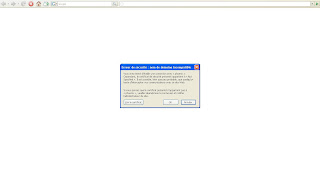
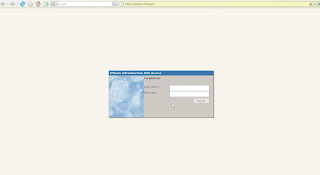
At this step, you have to enter the username/password used for install the VMWare software. Note for the Vista user, the user must be flag as Administrator.
Then, add a virtual machine, which will be a Guest OS, and will host OEL4.6 :
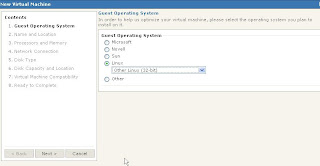
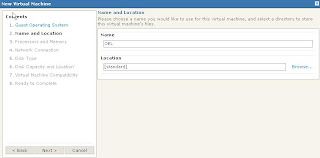
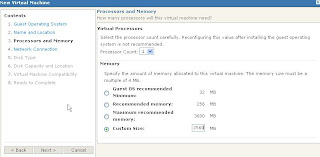
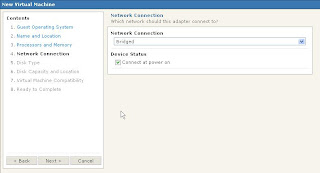
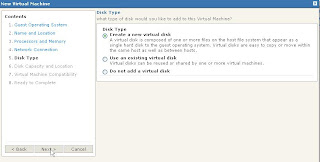
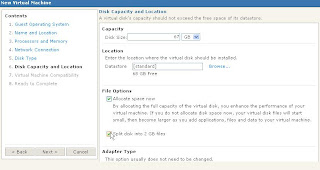
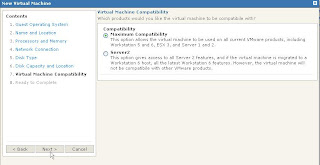
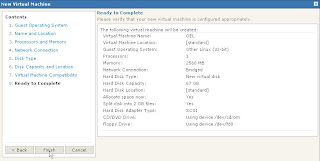
One of the key point is the network configuration, by choosing Bridge, the Guest OS will be independant of your Host OS. It will be able to see all the network, and to be seeing from all the network.
A quick re-call, Guest and Host are used only regarding the VMWare software, the Host OS is the OS whicj the VMWare has been installed on, the Guests are installed through the VMWare virtual machine.
The screenshots above are just for example, but you can choose to create a special folder (or drive) to host the Guest filesystems.
As I did for my OEL virtual machine installation.
Lastly, you have a page which resume all your VM :
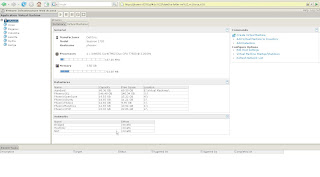 Now, you'll be able to go into the new VM (Virtual Machine) :
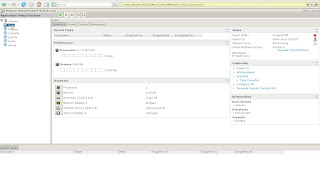 To install your Guest OS, insert the install CD, a run the VM (green triangle), you can see what happens in the Console tab :
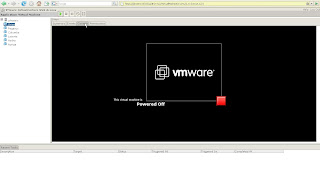 Well, this is a beta version, but seems working fine.
However, there are some odds things :
1. The main thing is the amount of the required memory, not less than 250Mb just for the Tomcat server which manage the virtual server. If you add around 100Mb for 5 others VMWare processes, you'll need 350Mb RAM just to run VMWare. It's a bad new, moreover, you have to take in account the Host OS RAM requirement, the Guest OS RAM requirement, plus the further database, plus the further Peoplesoft application (Application server, Process SCheduler and Web server), you need a lot of RAM. And my 4Gb won't be too low.
2. Some problem on the Guest's screen definition which not allowed you to get your Guest OS in FullScreen mode, not funny if you want to work as a desktop...
Anyway, it's still easy to use.
Next step, OEL4.6 install,
Have fun.
In order for a Peoplesoft installation, I need a supported OS for Peoplesoft, so, I'll go for Oracle Entreprise Linux 4 update 6 (since Peoplesoft is not yet certified on OEL5). This will be my server.
So, instead of having two PC, a virtual machine seems the best way.
I'll install VMWare server, and since there is a version 2.0, I'll try that one, even if it's in beta version. The GUI is a web application. Installation is very easy, download, run the installer, and click next...
A new icon is added on the Quick Launch bar, click on it, you'll see the following ones :


At this step, you have to enter the username/password used for install the VMWare software. Note for the Vista user, the user must be flag as Administrator.
Then, add a virtual machine, which will be a Guest OS, and will host OEL4.6 :


One of the key point is the network configuration, by choosing Bridge, the Guest OS will be independant of your Host OS. It will be able to see all the network, and to be seeing from all the network.
A quick re-call, Guest and Host are used only regarding the VMWare software, the Host OS is the OS whicj the VMWare has been installed on, the Guests are installed through the VMWare virtual machine.
The screenshots above are just for example, but you can choose to create a special folder (or drive) to host the Guest filesystems.
As I did for my OEL virtual machine installation.
Lastly, you have a page which resume all your VM :
 Now, you'll be able to go into the new VM (Virtual Machine) :
 To install your Guest OS, insert the install CD, a run the VM (green triangle), you can see what happens in the Console tab :
 Well, this is a beta version, but seems working fine.
However, there are some odds things :
1. The main thing is the amount of the required memory, not less than 250Mb just for the Tomcat server which manage the virtual server. If you add around 100Mb for 5 others VMWare processes, you'll need 350Mb RAM just to run VMWare. It's a bad new, moreover, you have to take in account the Host OS RAM requirement, the Guest OS RAM requirement, plus the further database, plus the further Peoplesoft application (Application server, Process SCheduler and Web server), you need a lot of RAM. And my 4Gb won't be too low.
2. Some problem on the Guest's screen definition which not allowed you to get your Guest OS in FullScreen mode, not funny if you want to work as a desktop...
Anyway, it's still easy to use.
Next step, OEL4.6 install,
Have fun.
Wednesday, December 12, 2007
New lab
My new lab :
Dell Inspiron 1720
Windows XP Pro SP2
4Gb RAM
500Gb hard disk (2x250Gb)
Intel Core 2 Duo T7500
Of course, such config is not just for fun, but to test... Oracle databases and Peoplesoft application.
1. Windows XP Pro SP2 : my client machine (however, Oracle 9i, 10g and 11g database server installed)
2. VMWare 2.0 (beta version - very easy to install and use) :
2.1 OpenSuse 10.3, my local DNS server
2.2 OEL (4.x or 5.1, to be defined), coming soon, but my database server, and Peopelsoft application/tools/web server.
Coming soon example of Peoplesoft installation, maybe under the Peoplesoft forum.
Now, I have to find time to work hardly and install all what required on my new lab.
Enjoy,
Dell Inspiron 1720
Windows XP Pro SP2
4Gb RAM
500Gb hard disk (2x250Gb)
Intel Core 2 Duo T7500
Of course, such config is not just for fun, but to test... Oracle databases and Peoplesoft application.
1. Windows XP Pro SP2 : my client machine (however, Oracle 9i, 10g and 11g database server installed)
2. VMWare 2.0 (beta version - very easy to install and use) :
2.1 OpenSuse 10.3, my local DNS server
2.2 OEL (4.x or 5.1, to be defined), coming soon, but my database server, and Peopelsoft application/tools/web server.
Coming soon example of Peoplesoft installation, maybe under the Peoplesoft forum.
Now, I have to find time to work hardly and install all what required on my new lab.
Enjoy,
Comeback on blogosphere
Well, around one year after my last post here, I'm coming back, and try to update to date more often this blog.
What's new since last year ?
A lot of things :
. Oracle 11g is out (on most of plateforms).
. Most of the Peoplesoft applications are now in version 9.0
. A new look on the OTN forum side
. New forums entries : PeopleSoft General Discussion, Ospace Community Feedback and Suggestions and Peoplesoft on Grid (and a lot of others...)
. Oracle Wiki : http://wiki.oracle.com
...
I'll try to participate on the new Peoplesoft forums sides.
Have fun,
What's new since last year ?
A lot of things :
. Oracle 11g is out (on most of plateforms).
. Most of the Peoplesoft applications are now in version 9.0
. A new look on the OTN forum side
. New forums entries : PeopleSoft General Discussion, Ospace Community Feedback and Suggestions and Peoplesoft on Grid (and a lot of others...)
. Oracle Wiki : http://wiki.oracle.com
...
I'll try to participate on the new Peoplesoft forums sides.
Have fun,
Monday, December 18, 2006
Thursday, November 16, 2006
PeopleTools 8.48 prerequisites
Our OS is AIX5.2.
Installation of PeopleTools 8.48 patch 04 without problem.
Unfortunately, configuring the AppServer abort :
/exec/applis/r5a8/G1R0/ETU_FS/hrms89/app/appserv> psadmin
PSADMIN -- Tools Release: 8.48.04
Copyright (c) 1988-2005 PeopleSoft, Inc. All Rights Reserved.
--------------------------------
PeopleSoft Server Administration
1) Application Server
2) Process Scheduler
3) Search Server
q) Quit
Command to execute (1-3, q): 1
PeopleSoft Application Server Administration
1) Administer a domain
2) Create a domain
3) Delete a domain
4) Import domain configuration
q) Quit
Command to execute (1-4, q) : 2
Please enter name of domain to create :TESTPT48
Configuration templates:
1) developer
2) large
3) medium
4) small
Select config template number: 4
Creating domain...
Copying application server configuration files...
Stripping Annotations...
Copying Jolt repository file...
Copying Java Query client files...
Domain created.
Would you like to configure this domain now? (y/n) [y] :y
Quick-configure menu -- domain: TESTPT48
Features Settings
========== ==========
1) Pub/Sub Servers : No 15) DBNAME :[TESTPT48]
2) Quick Server : No 16) DBTYPE :[ORACLE]
3) Query Servers : No 17) UserId :[QEDMO]
4) Jolt : Yes 18) UserPswd :[QEDMO]
5) Jolt Relay : No 19) DomainID :[TESTSERV]
6) WSL : No 20) AddToPATH :[.]
7) PC Debugger : No 21) ConnectID :[people]
8) Event Notification: Yes 22) ConnectPswd:[peop1e]
9) MCF Servers : No 23) ServerName :[]
10) Perf Collator : No 24) WSL Port :[7000]
11) Analytic Servers : Yes 25) JSL Port :[9000]
12) Domains Gateway : No 26) JRAD Port :[9100]
Actions
=========
13) Load config as shown
14) Custom configuration
h) Help for this menu
q) Return to previous menu
HINT: Enter 15 to edit DBNAME, then 13 to load
Enter selection (1-26, h, or q): 13
Performing load prechecks ...
exec(): 0509-036 Cannot load program ubbgen because of the following errors:
rtld: 0712-001 Symbol _Getctype__FPCc was referenced
from module /exec/applis/r5a8/G1R0/ETU_FS/hrms89/app/bin/libpsmt.a(), but a
runtime definition
of the symbol was not found.
rtld: 0712-001 Symbol __ct__Q2_3std8_LocinfoFPCci was referenced
from module /exec/applis/r5a8/G1R0/ETU_FS/hrms89/app/bin/libpsmt.a(), but a
runtime definition
of the symbol was not found.
rtld: 0712-002 fatal error: exiting.
==============ERROR!================
UBBGEN encountered an error while configuring!
==============ERROR!================
After some research, undocumented prerequites about C-libraries.
Our is :
/exec/applis/r5a8/G1R0/ETU_FS/hrms89/app/appserv> lslpp -l | grep rte | grep xlC
xlC.aix50.rte 6.0.0.13 COMMITTED C Set ++ Runtime for AIX 5.0
xlC.msg.en_US.rte 6.0.0.0 COMMITTED C Set ++ Runtime
xlC.rte 6.0.0.0 COMMITTED C Set ++ Runtime
/exec/applis/r5a8/G1R0/ETU_FS/hrms89/app/appserv>
And it should be
xlC.aix50.rte.8.0.0.1 or later
xlC.rte.8.0.0.0 or later
Well, waiting for an install.
Installation of PeopleTools 8.48 patch 04 without problem.
Unfortunately, configuring the AppServer abort :
/exec/applis/r5a8/G1R0/ETU_FS/hrms89/app/appserv> psadmin
PSADMIN -- Tools Release: 8.48.04
Copyright (c) 1988-2005 PeopleSoft, Inc. All Rights Reserved.
--------------------------------
PeopleSoft Server Administration
1) Application Server
2) Process Scheduler
3) Search Server
q) Quit
Command to execute (1-3, q): 1
PeopleSoft Application Server Administration
1) Administer a domain
2) Create a domain
3) Delete a domain
4) Import domain configuration
q) Quit
Command to execute (1-4, q) : 2
Please enter name of domain to create :TESTPT48
Configuration templates:
1) developer
2) large
3) medium
4) small
Select config template number: 4
Creating domain...
Copying application server configuration files...
Stripping Annotations...
Copying Jolt repository file...
Copying Java Query client files...
Domain created.
Would you like to configure this domain now? (y/n) [y] :y
Quick-configure menu -- domain: TESTPT48
Features Settings
========== ==========
1) Pub/Sub Servers : No 15) DBNAME :[TESTPT48]
2) Quick Server : No 16) DBTYPE :[ORACLE]
3) Query Servers : No 17) UserId :[QEDMO]
4) Jolt : Yes 18) UserPswd :[QEDMO]
5) Jolt Relay : No 19) DomainID :[TESTSERV]
6) WSL : No 20) AddToPATH :[.]
7) PC Debugger : No 21) ConnectID :[people]
8) Event Notification: Yes 22) ConnectPswd:[peop1e]
9) MCF Servers : No 23) ServerName :[]
10) Perf Collator : No 24) WSL Port :[7000]
11) Analytic Servers : Yes 25) JSL Port :[9000]
12) Domains Gateway : No 26) JRAD Port :[9100]
Actions
=========
13) Load config as shown
14) Custom configuration
h) Help for this menu
q) Return to previous menu
HINT: Enter 15 to edit DBNAME, then 13 to load
Enter selection (1-26, h, or q): 13
Performing load prechecks ...
exec(): 0509-036 Cannot load program ubbgen because of the following errors:
rtld: 0712-001 Symbol _Getctype__FPCc was referenced
from module /exec/applis/r5a8/G1R0/ETU_FS/hrms89/app/bin/libpsmt.a(), but a
runtime definition
of the symbol was not found.
rtld: 0712-001 Symbol __ct__Q2_3std8_LocinfoFPCci was referenced
from module /exec/applis/r5a8/G1R0/ETU_FS/hrms89/app/bin/libpsmt.a(), but a
runtime definition
of the symbol was not found.
rtld: 0712-002 fatal error: exiting.
==============ERROR!================
UBBGEN encountered an error while configuring!
==============ERROR!================
After some research, undocumented prerequites about C-libraries.
Our is :
/exec/applis/r5a8/G1R0/ETU_FS/hrms89/app/appserv> lslpp -l | grep rte | grep xlC
xlC.aix50.rte 6.0.0.13 COMMITTED C Set ++ Runtime for AIX 5.0
xlC.msg.en_US.rte 6.0.0.0 COMMITTED C Set ++ Runtime
xlC.rte 6.0.0.0 COMMITTED C Set ++ Runtime
/exec/applis/r5a8/G1R0/ETU_FS/hrms89/app/appserv>
And it should be
xlC.aix50.rte.8.0.0.1 or later
xlC.rte.8.0.0.0 or later
Well, waiting for an install.
Sunday, October 29, 2006
Linux distro choice
You want to install a linux distro. But what distro is for you ?
The Linux Distribution Chooser is a website which can help you in the distro choice. Without to be exhaustive, it can help for the linux beginners.
The Linux Distribution Chooser is a website which can help you in the distro choice. Without to be exhaustive, it can help for the linux beginners.
Bundles installation
Before the Change Assistant, the bundles installation was nightmare, because of there was only manual steps. And as a bundle is a set of corrections, there is several steps.
Now, with Change Assistant, there is less manual step, but the time of installation is now incredible long. One day per bundle, imagine, when we have to instal several bundles... In fact, the change assistant lose too many time in file transfer : open/close a ftp connection for each file to have to transfer. It's very consume time.
One solution is to stop the process during the automatic ftp, run it manual, set to complete these steps, and restart the Change Assistant.
Anyway, even the project installation, the datamover running and the sql seems to be slower than manual.
One advantage of auto step, you can read the newspapers (professional newspapers, of course), and learn by OTN forum participation. ;-)
Now, with Change Assistant, there is less manual step, but the time of installation is now incredible long. One day per bundle, imagine, when we have to instal several bundles... In fact, the change assistant lose too many time in file transfer : open/close a ftp connection for each file to have to transfer. It's very consume time.
One solution is to stop the process during the automatic ftp, run it manual, set to complete these steps, and restart the Change Assistant.
Anyway, even the project installation, the datamover running and the sql seems to be slower than manual.
One advantage of auto step, you can read the newspapers (professional newspapers, of course), and learn by OTN forum participation. ;-)
Saturday, August 26, 2006
PeopleSoft Installation : what required
In order to install a PeopleSoft application, we need to choose a database.
Oracle seems a good choice, even if the development was (still is ?) in most of case on SQL Server...
Then Tuxedo, and a webserver like Weblogic.
The choice of PeopleTools version, actually the last version is 8.48 (new from July), can be deciding what you can, and how many time your application can live without a big upgrade.
You can download all softwares (main version, not upgrade) on http://edelivery.oracle.com/ (unfortunately a http server, so download can be long) and patches on the ftp server ftp.peoplesoft.com (anonymous user).
I advise the reading of the white paper PeopleSoft Enterprise Architecture for more understanding.
Oracle seems a good choice, even if the development was (still is ?) in most of case on SQL Server...
Then Tuxedo, and a webserver like Weblogic.
The choice of PeopleTools version, actually the last version is 8.48 (new from July), can be deciding what you can, and how many time your application can live without a big upgrade.
You can download all softwares (main version, not upgrade) on http://edelivery.oracle.com/ (unfortunately a http server, so download can be long) and patches on the ftp server ftp.peoplesoft.com (anonymous user).
I advise the reading of the white paper PeopleSoft Enterprise Architecture for more understanding.
Wednesday, August 16, 2006
Copybase and PSCA
The copy of a database is one of the tasks of a PS admin : to reinit a database from a reference database, to test bundle for example.
But some tasks mustn't be forget.
PSCA - PeopleSoft Change Assistant - is the new assistant to manage upgrade since 8.4x PeopleTools.
Before it was PSUA - PeopleSoft Upgrade Assistant - which was more a informational guide rather than a real assistant.
Since 8.4x PeopleTools, this new tool is very nice to help in bundles/patches/fix installation, there is only few manual tasks.
PSCA work by PS_HOME and by database. He needs a unique identifier into database, this is GUID column from PSOPTIONS table.
This field, not nullable, is initialize on start of the application server only if he's blank value.
So, after a copy of database, DON'T forget to update this field, without what, PSCA will not see your database in your environment, and you will lose some of time to search why...
SQL> select guid from psoptions;
GUID
--------------------------------------------------------------------------------
d96d2afa-1dd1-11b2-9e1f-dbeeda0b41ec
SQL> update psoptions set guid= ' ';
1 row updated.
SQL> commit;
Commit complete.
Here I restart the appserver, then :
SQL> select guid from psoptions;
GUID
--------------------------------------------------------------------------------
ae7099f4-1dd1-11b2-8d5a-fe9855e7faff
SQL>
We will see later that there are some of update after a copy of database, this one today, is only one of these tasks.
But some tasks mustn't be forget.
PSCA - PeopleSoft Change Assistant - is the new assistant to manage upgrade since 8.4x PeopleTools.
Before it was PSUA - PeopleSoft Upgrade Assistant - which was more a informational guide rather than a real assistant.
Since 8.4x PeopleTools, this new tool is very nice to help in bundles/patches/fix installation, there is only few manual tasks.
PSCA work by PS_HOME and by database. He needs a unique identifier into database, this is GUID column from PSOPTIONS table.
This field, not nullable, is initialize on start of the application server only if he's blank value.
So, after a copy of database, DON'T forget to update this field, without what, PSCA will not see your database in your environment, and you will lose some of time to search why...
SQL> select guid from psoptions;
GUID
--------------------------------------------------------------------------------
d96d2afa-1dd1-11b2-9e1f-dbeeda0b41ec
SQL> update psoptions set guid= ' ';
1 row updated.
SQL> commit;
Commit complete.
Here I restart the appserver, then :
SQL> select guid from psoptions;
GUID
--------------------------------------------------------------------------------
ae7099f4-1dd1-11b2-8d5a-fe9855e7faff
SQL>
We will see later that there are some of update after a copy of database, this one today, is only one of these tasks.
Subscribe to:
Posts (Atom)

