Monday, February 14, 2011

Oracle Linux 6.0

Few weeks after 5.6, Oracle Enterprise Linux is definitely gone, welcome Oracle Linux ! The well known Oracle Enterprise Linux has changed the name within the versions 5.6 and now 6.0, this last one released last Friday. See the announcement on the Oracle’s Linux Blog.

I’ll install this OL6.0 on a virtual machine with VMWare Server 2.0.2, choosing RHEL5.0 64-bit type of VM.

From within the first screen, we feel in Oracle world, much more than ever, as well as the new name.

 OEL60_001
OEL60_002
Then the big red splash screen, and language settings
OEL60_003 OEL60_004 OEL60_005 OEL60_006 OEL60_007
We are installing a database server, DHCP is not a good option, do not forget to set a fixed IP address
OEL60_008 OEL60_009 OEL60_010 OEL60_011 OEL60_012
OEL60_013 OEL60_014 OEL60_015 OEL60_016
Define the type of the server we are building
OEL60_017
And add packages if needed (be aware, since OL 6.0 is not yet certified within the Oracle database, the package oracle-validated-1 available on previous version is not available yet for that Linux version
OEL60_018 OEL60_019 OEL60_020 OEL60_021 OEL60_022 OEL60_023
And the installer continues
OEL60_024 OEL60_025 OEL60_026
After reboot, final steps
OEL60_027 OEL60_028 OEL60_029 OEL60_030  OEL60_032 OEL60_033 OEL60_034  OEL60_036 OEL60_037 OEL60_038
Set the network to start automatically if you did not do it on previous step
OEL60_039

[root@orion4 ~]# uname -a
Linux orion4.phoenix.nga 2.6.32-100.28.5.el6.x86_64 #1 SMP Wed Feb 2 18:40:23 EST 2011 x86_64 x86_64 x86_64 GNU/Linux
[root@orion4 ~]# more /etc/redhat-release
Red Hat Enterprise Linux Server release 6.0 (Santiago)
[root@orion4 ~]#


Installation of VMWare Server 2.0.2 tools
 OEL60_VMWARE_TOOLS_001 OEL60_VMWARE_TOOLS_002
Open a terminal from the desktop
OEL60_VMWARE_TOOLS_003
Mount the cdrom, and untar the vmwaretools into a temp directory, then run the tools installer
OEL60_VMWARE_TOOLS_004 OEL60_VMWARE_TOOLS_005 OEL60_VMWARE_TOOLS_006 OEL60_VMWARE_TOOLS_007 OEL60_VMWARE_TOOLS_008
We do not need the C compiler, reply no to all of those questions, and it is successfully finishing
OEL60_VMWARE_TOOLS_009 OEL60_VMWARE_TOOLS_010 OEL60_VMWARE_TOOLS_011 OEL60_VMWARE_TOOLS_012
OEL60_VMWARE_TOOLS_013

Enjoy it !

Nicolas.

Sunday, February 13, 2011

Peoplesoft OVM HCM9.1 – Peopletools 8.51.02

Few weeks ago a new Peoplesoft OVM HCM9.1 has been released. This one is based on Peopletools 8.51.02, and includes a couples of new features :
1. Option for Cobol installation within 30-days trial
2. Peoletools 8.51.02
3. Server consolidation, 1 database server, 1 App/Batch/PIA server
4. And a good one, a zip for the Peopletools 8.51.02 Windows client

It is available on http://edelivery.oracle.com/linux – check for the templates 64bits, : Peoplesoft VM Templates for HCM 9.1 Release Media Pack v1 for x86 (64 bit).
There are two templates, one for the database, one for the app/batch/PIA.
I’ll skip all the steps regarding Oracle VM Manager, Oracle VM Server configuration, uncompress and import of the template since this is the same exercise I did last year for HCM9.1, please if you want to know more, have a look to the tutorial on the top-right of the main blog page. I’ll start the description below from the starting of the new VM.

1. The database server
Select the VM and click on “Power On” 
PSOVM_HCM91_003 
Then on console (be fast otherwise it will be configured as DHCP that you certainly don’t want).
PSOVM_HCM91_004
PSOVM_HCM91_005 
Give all what it needs, IP address and so on :
PSOVM_HCM91_006 
Here below, (as usual on Peoplesoft template, I do not know if that’s the same for all Oracle template containing database software), we got the CSS error (this step takes quite a while). Whether it fails that is not an issue for the next steps  :
PSOVM_HCM91_008
It continues, give the database name, it will create new controlfiles.
PSOVM_HCM91_009 
It is finished for the database server.
Few notes :
1.1 I choose the database to start on server boot, but it won’t (same for all previous templates).
[oracle@psovmhcmdb ~]$ more /etc/oratab
...
orcl:/u01/app/oracle/product/11.1.0/db_1:N

1.2 Note, the service is your_db_name.us.oracle.com :
[oracle@psovmhcmdb ~]$ lsnrctl status

LSNRCTL for Linux: Version 11.1.0.7.0 - Production on 23-JAN-2011 06:21:08

Copyright (c) 1991, 2008, Oracle.  All rights reserved.

Connecting to (DESCRIPTION=(ADDRESS=(PROTOCOL=TCP)(HOST=psovmhcmdb.phoenix.nga)(PORT=1521)))
STATUS of the LISTENER
------------------------
Alias                     LISTENER
Version                   TNSLSNR for Linux: Version 11.1.0.7.0 - Production
Start Date                23-JAN-2011 06:11:49
Uptime                    0 days 0 hr. 9 min. 19 sec
Trace Level               off
Security                  ON: Local OS Authentication
SNMP                      OFF
Listener Parameter File   /u01/app/oracle/product/11.1.0/db_1/network/admin/listener.ora
Listener Log File         /u01/app/oracle/product/11.1.0/db_1/log/diag/tnslsnr/psovmhcmdb/listener/alert/log.xml
Listening Endpoints Summary...
  (DESCRIPTION=(ADDRESS=(PROTOCOL=tcp)(HOST=psovmhcmdb.phoenix.nga)(PORT=1521)))
  (DESCRIPTION=(ADDRESS=(PROTOCOL=ipc)(KEY=EXTPROC1521)))
Services Summary...
Service "H91TMPLT.us.oracle.com" has 1 instance(s).
  Instance "H91TMPLT", status READY, has 1 handler(s) for this service...
Service "H91TMPLT_XPT.us.oracle.com" has 1 instance(s).
  Instance "H91TMPLT", status READY, has 1 handler(s) for this service...
Service "XDB.us.oracle.com" has 1 instance(s).
  Instance "H91TMPLT", status READY, has 1 handler(s) for this service...
The command completed successfully

1.3 SYSADM’s password is in upper case :
[oracle@psovmhcmdb ~]$ export ORACLE_SID=H91TMPLT
[oracle@psovmhcmdb ~]$ sqlplus sysadm/sysadm

SQL*Plus: Release 11.1.0.7.0 - Production on Sun Jan 23 06:21:31 2011

Copyright (c) 1982, 2008, Oracle.  All rights reserved.

ERROR:
ORA-01017: invalid username/password; logon denied

Enter user-name:
[oracle@psovmhcmdb ~]$ sqlplus sysadm/SYSADM

SQL*Plus: Release 11.1.0.7.0 - Production on Sun Jan 23 06:21:37 2011

Copyright (c) 1982, 2008, Oracle.  All rights reserved.

Connected to:
Oracle Database 11g Enterprise Edition Release 11.1.0.7.0 - 64bit Production
With the Partitioning, OLAP, Data Mining and Real Application Testing options

SQL>

1.4 Language installed is only English :
SQL> select language_cd from pslanguages where installed=1;

LANGUAGE_CD
------------
ENG

1.5 The default profile of SYSADM and PEOPLE users does not expire anymore like it was for all the previous PSOVM. All the limits are unlimited, much better to avoid bad surprise as I explained here.  
SQL> select username,account_status,expiry_date,profile
  2  from   dba_users
  3* where username in ('PEOPLE','SYSADM')
SQL> /

USERNAME                       ACCOUNT_STATUS                   EXPIRY_DATE        PROFILE
------------------------------ -------------------------------- ------------------ -----------PEOPLE                         OPEN                                                DEFAULT
SYSADM                         OPEN                                                DEFAULT

SQL> select * from dba_profiles where profile='DEFAULT';

PROFILE                        RESOURCE_NAME                    RESOURCE_TYPE                    LIMIT
------------------------------ -------------------------------- -------------------------------- -------------
DEFAULT                        COMPOSITE_LIMIT                  KERNEL                           UNLIMITED
DEFAULT                        SESSIONS_PER_USER                KERNEL                           UNLIMITED
DEFAULT                        CPU_PER_SESSION                  KERNEL                           UNLIMITED
DEFAULT                        CPU_PER_CALL                     KERNEL                           UNLIMITED
DEFAULT                        LOGICAL_READS_PER_SESSION        KERNEL                           UNLIMITED
DEFAULT                        LOGICAL_READS_PER_CALL           KERNEL                           UNLIMITED
DEFAULT                        IDLE_TIME                        KERNEL                           UNLIMITED
DEFAULT                        CONNECT_TIME                     KERNEL                           UNLIMITED
DEFAULT                        PRIVATE_SGA                      KERNEL                           UNLIMITED
DEFAULT                        FAILED_LOGIN_ATTEMPTS            PASSWORD                         UNLIMITED
DEFAULT                        PASSWORD_LIFE_TIME               PASSWORD                         UNLIMITED
DEFAULT                        PASSWORD_REUSE_TIME              PASSWORD                         UNLIMITED
DEFAULT                        PASSWORD_REUSE_MAX               PASSWORD                         UNLIMITED
DEFAULT                        PASSWORD_VERIFY_FUNCTION         PASSWORD                         NULL
DEFAULT                        PASSWORD_LOCK_TIME               PASSWORD                         UNLIMITED
DEFAULT                        PASSWORD_GRACE_TIME              PASSWORD                         UNLIMITED

16 rows selected.

2. The App/Batch/PIA server
Select the VM and click on “Power On”
PSOVM_HCM91_010
PSOVM_HCM91_011
PSOVM_HCM91_012
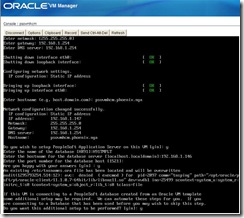
Give all what it needs, IP address and so on :
PSOVM_HCM91_015 
Here, we can see an OS audit message with access denied. Despite that message, everything will be done
successfully.
PSOVM_HCM91_018
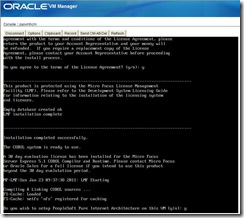
After AppServer and Batch server started, it is now time for MicroFocus (optional - 30-days trial license). It is quite new in template for that option during deployment. Thanks to Peoplesoft team for that, that safe a lot of time and pain (see how I did for the first version of PSOVM HCM when it was not available here
PSOVM_HCM91_019
PSOVM_HCM91_021
Once it is done, PIA deployment :
PSOVM_HCM91_023
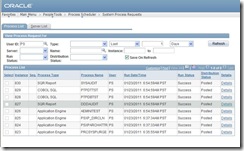
And you also can configure posting reports repository :
PSOVM_HCM91_024
PSOVM_HCM91_025 
Done.
It has again been greatly improved compared to the first template released earlier in 2009 (PSOVM HCM). Looks like many of the remarks have been taken in account. Thanks to the team for that.
Now, connect to the front end application :
PSOVM_HCM91_026
PSOVM_HCM91_033
PSOVM_HCM91_031 

Note : you’ll get some OS audit warning like for CRM, you can read the footnote here how you can get rid of them.

3. Peopletools 8.51.02 zip file for Windows client
Last but not least, for the first time ever, Peoplesoft is providing the binaries for Application Designer and DataMover for Windows in version 8.51.02. Under $PS_HOME of App/Batch/PIA server. 
[psadm2@psovmhcm tools]$ pwd
/opt/oracle/psft/pt/tools
[psadm2@psovmhcm tools]$ ls
HR                          dict                    setup
HR_InstallLog.log           etc                     sqr
PSEMAgent                   fonts                   sqrfonts
PSEMViewer                  jre                     src
PeopleTools_InstallLog.log  jre1.6.0                tmp
SecurityAddIns              log                     toolsadmin.sh
appserv                     peopletools.properties  toolsclient.zip <---
bin                         psconfig.sh             utility
cblbin                      scripts                 verity
class                       sdk                     web
data                        secvault                webserv
Copy to your Windows client, unzip, enjoy AppDesigner 8.51.02 ! In 2-tier, you’ll need an Oracle client, in 3-tier, no need Oracle client, but you’ll have to configure a WSL listener on the AppServer domain.

***
We have now a complete working and consistent Peoplesoft  solution relatively easy to install. Moreover, providing a client is very useful for students, developers, functional people who want to learn.

Stay tuned, I’ll probably set the Integration Broker in between.

Enjoy !

Nicolas.

Tuesday, January 11, 2011

About Peoplesoft Feature Pack

Last month, in December 2010 has been release the first Feature Pack of HCM9.1. What does it mean ? What are the changes ?
HCM9.1 has been delivered based on Peopletools 8.50 in Sept. 2009, much before the Peopletools 8.51. With this Feature Pack, HCM9.1 has been rebuilt and is now based on Peopletools 8.51.
Available on edelivery, this HCM9.1 Feature Pack Dec 2010 replace the previous software installer.
It means :
1. When working on Peopletools 8.51, you do not have to manage a Peopletools upgrade anymore for new installation.
2. It cannot work within Peopletools 8.50 as before.
3. If you’re working on HCM9.1 and Peopletools 8.50 (previously installed that Feature Pack), you must keep a copy of the software, HCM9.1 based on Peopltools 8.50 is not available anymore.

It is well explained in the Supplemental Installation Guide of HCM (also available on edelivery) : “ To run PeopleSoft Enterprise Human Resources Management System 9.1 Feature Pack December 2010 (HRMS 9.1 Feature Pack 2010), you must be using PeopleSoft PeopleTools 8.51.02 or higher.
The Peopletools 8.51 Installation Guide I was always referring to does not know the Feature Pack and has not been updated yet. So it is mentioning that HCM9.1 needs an upgrade to Peopletools 8.51… you must take care, that is became wrong.

So far, Feature Pack exists only for HCM and it seems only FSCM will follow that rule. Lastly, Feature Pack are planned to be yearly delivered.
Find out more in the My Oracle Support note : Master Solution - PeopleSoft Enterprise HRMS Version 9.1 Feature Packs [ID 1268076.1]

Nicolas.

Friday, December 31, 2010

DB Wizard for Oracle on Windows 2008R2 64-bit

A year ago, I was testing the DB Wizard 8.50 for Oracle on Linux. It was painful, and really has not been successful as I would expect. Right now, I’d like to see how the DB Wizard is working on Windows 2008R2 64-bit within the latest Peopletools version, 8.51.
As I said in the linked article above, DB Wizard is not my cup of tea, it is configuring all by default which you do not necessarily want for a production system and it requires the Peopletools installation on your DB server which again you do not necessarily want for a production system. But over the years, I noticed a lot of people are trying to use it because they are not DBA and just want to get a working Peoplesoft application to be able to learn Peoplecode, and/or functional features (without taking care of all the admin settings). So, I think a nice proper tool to build a DEMO database would be very nice in such cases.

Unfortunately, it is not ready yet. First of all, Peopletools 8.5x are certified only on 64-bit OS, however on Windows it needs the 32-bit Oracle librairies, and we’ll see that cause some troubles for the DB Wizard. A full 64-bit application would be much much more easier to manage.

If you did not installed the 32-bit client, you’ll most likely receive the following error (the well known “missing or invalid version of SQL library PSORA”) :
DBWizard851_W2k8_035
So, I installed Oracle 11.2.0.2 64-bit database software in one Oracle home, then 11.2.0.2 32-bit client software in an other one.

Created the init.ora file with the minimum required :
DBWizard851_W2k8_002 
And password file as well :
DBWizard851_W2k8_003
Start the listener :
DBWizard851_W2k8_006
Update the tnsnames.ora in both Oracle home (server/client) :
DBWizard851_W2k8_007
Then start the DBWizard utility (%PS_HOME%\setup\PsMpDbInstall\setup.bat), and it looks very handy and straightforward :
DBWizard851_W2k8_008
DBWizard851_W2k8_009DBWizard851_W2k8_010DBWizard851_W2k8_011
DBWizard851_W2k8_012DBWizard851_W2k8_013
On the screen below, I was wondering if I should put the 32-bit client for sqlplus, but no, it won’t work (I tested it), same for the Oracle home, it should be the 64-bit database software installation path directory.
DBWizard851_W2k8_014
DBWizard851_W2k8_015DBWizard851_W2k8_016DBWizard851_W2k8_017
DBWizard851_W2k8_018 DBWizard851_W2k8_019DBWizard851_W2k8_020
DBWizard851_W2k8_021
And now start the process :
DBWizard851_W2k8_022
Before going further, you can check if the service is created as well as the database’s datafiles (such as SYSTEM, SYSAUX, UNDO, TEMP…).     
DBWizard851_W2k8_023DBWizard851_W2k8_030
Everything works fine, service is created, database is created, datafiles are there. Even the xxddl.sql script is executed properly and all the Peoplesoft tablespaces are created.
DBWizard851_W2k8_025
But it failed down on the last step, the call of psdmtx to load the database !
DBWizard851_W2k8_036DBWizard851_W2k8_037
The logfile is not very useful, is it ?
DBWizard851_W2k8_038
However, when I run it from DOS command prompt, dbsetup.dms call is working fine :
DBWizard851_W2k8_042     
I was out of luck to make it working through DB Wizard.
Well, the dbsetup.dms creates the proper dms to load the database manually, but I’d be happy if it did it by itself. You can run it from DOS command prompt, or through DataMover GUI :
DBWizard851_W2k8_043
And do not worry if it stated “not responded”, that’s perfectly normal…

Well, once more, disappointing tool. Unless someone has suggestion how to make it working ?

Have fun,

Nicolas.